Windows 8 Iso Download Manager
After looking up on the internet, I've found a nice workaround (credit to the person figured it out), and I'll share it with you here.
Before getting started, you will need a Windows 8 Product Key. Computers with Windows 8 preinstalled, the key is inside the bios. These key may or may not work, but you can still try it out.
To extract the key out, use a Key viewing utility, like KeyFinder or other similar programs.
1. Go to Microsoft's Windows 8 Upgrade site
http://windows.microsoft.com/en-us/windows-8/upgrade-product-key-only
2. Download and save both setup (Install Windows 8 and Install Windows 8.1) files to your computer.
3. Go to the location where the files are saved.
4. Run Windows8-Setup and let it load
5. Type in your Windows 8 Product Key
6. Setup will analyze the key and then begin downloading.
7. Once it starts to download, click on the X on the top right corner and cancel it (no need to finish downloading).
8. Run WindowsSetupBox
9. Windows 8.1 will automatically beginning downloading. This may take a while so be patient
10. After it's done downloading, it will provide you with 3 options
11. From here on, you can create a ISO media, a USB bootable media or run from your Desktop.
For ISO media, setup will ask for a location to save the image. After that, burn it to a blank DVD.
1. Select Install by creating media and click Next
2. Click on ISO file and click save
3. Save to a location and label the iso file
4.Setup will being creating a image
5. Image creation complete
6. Go the location where the ISO image is saved and right click to open up Window's image burning utility.
7. Click burn to start burning from ISO to a blank DVD media
For USB media, setup will ask for a USB flash drive of at least 3GB. And setup will automatically create the USB media for you.
1. Click on Install by media
2. Click USB flash drive, then click next
3. Insert a USB flash drive
4. Format USB flash drive
5. Creating Windows 8.1 on a USB flash drive
6. USB media complete
Note: Backup data first if there is any on the USB drive.
Product key is made up for this tutorial, it's not a real key.
The version being downloaded corresponds to the product key that was used
Windows 8 Professional key = Windows 8.1 Professional
Windows 8 Core key = Windows 8.1 Core
Setup also looks at the platform your system is currently running.
Current OS is 32bit = Setup will automatically download Windows 8.1 32bit.
Current OS is 64bit = Setup will automatically download Windows 8.1 64bit.
Microsoft Windows and Office ISO Download Tool –Â A tiny tool from Heidoc developers, which brings an free, fast, and comfortable way to download genuine Windows 7, Windows 8.1 and Windows 10 disk images (ISO) directly from Microsoft’s servers, as well as Office 2007, Office 2010, Office 2013, Office 2016, and Office 2011 for Mac.
In the past Microsoft provided disk images for many of their products through their subcontractor “Digital River”. These downloads were pulled in early 2014. Afterwards, Microsoft made a limited selection of downloads available on their TechBench site. Our tool accesses that TechBench site, and unlocks a large number of hidden download files on it.
Requirements: Windows 7 or newer, .NET Framework 4.6.1 or newer, Internet Explorer 8 or newer.
Dell service tag lookup. ' The term 'Service Tag' is used by DELL COMPUTERS to uniquely identify each computer that they build & ship. I don't know of any other manufacturers that use the same term. > I just need confirmation that ' Service tag number and Serial numbers are same or not? > I found Serial number but I didn't find Service tag number.
The sims 3 razor1911 final maxspeed download torrent tpb free. But, to show my gratitude, I'll seed, because it is a good and easy-to-use-torrent. The read me file should be in the downloaded torrent.
Microsoft Windows 8 Download Iso
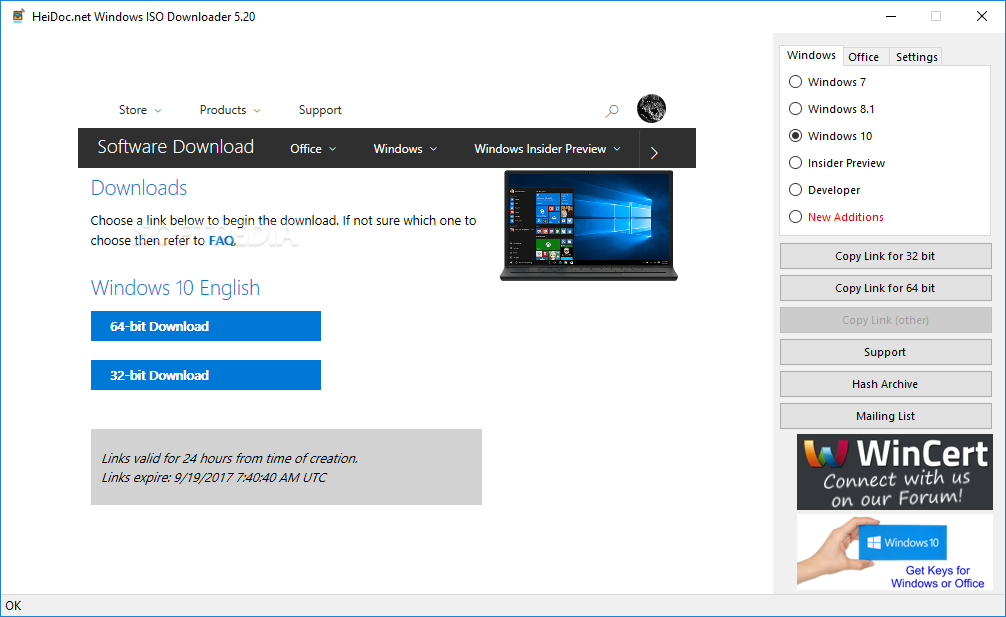
6 days ago - free download2.98. Windows ISO Downloader is the easy download tool for both genuine Microsoft Windows and Microsoft Office ISO files. Windows 10 / Windows 8 / Windows 7. Internet Download Manager 6.32 Build 6.
Download Windows 8.1 Disc Image (ISO File) If you need to install or reinstall Windows 8.1, you can use the tools on this page to create your own installation media using either a USB flash drive or a DVD. Download windows 10 iso with download manager I want to download windows 10 64 bit iso for my pc but problem is media creation tool takes too long to download and there is no option for pause and stop. Download Windows 8.1 Disc Image (ISO File). If you need to install or re-install Windows 8.1, you can use the tools on this page to create your own installation.
Changelog Version 6.22 (7 September 2018) :
- Added the latest developer and Insider versions up to build 17749; fixed all display and functional issues with Internet Explorer 8 and 9; new minimum requirement IE 8; updated to Bootstrap 4.1.3.
Homepage – https://www.heidoc.net/
Windows 8 Iso Download Manager Windows 10
Download: Windows ISO Downloader.exe